Did they actually read your proposal?
An open is not a read. Here's what page-level analytics measure, how to tell a genuine read from a two-second skim, and the four patterns worth acting on.
"Opened" is the least useful thing you can know about a document.
Somebody clicked. Did they read the first line and close it? Did they spend four minutes on the pricing page and then forward it to their CFO? Did they get as far as page two of nine? Every one of those is "opened", and every one of them calls for a different next email.
What you want is a read profile: which pages, in what order, for how long.
What actually gets measured
When someone opens a slim.to PDF or hosted page, the viewer reports back as they read. Specifically:
- Which page is on screen, and for how many seconds.
- Scroll depth — how far down a long page they got.
- Total read time for the session, tracked with a heartbeat every 30 seconds rather than a single event at the end. (Browsers are famously unreliable about firing an event when a tab closes; a heartbeat is not.)
- Tab visibility — switching to another tab or backgrounding the app on a phone stops the clock, so "12 minutes" means twelve minutes of the document actually being on screen.
Sessions are deduplicated for 24 hours, so the same person coming back after lunch is one viewer with two visits, not two viewers.
Four patterns worth acting on
Read profiles fall into recognisable shapes. These four come up constantly.
The bounce
One page, under ten seconds, no scroll. They opened it to see what it was and closed it.
Usually this means the document arrived at a bad moment, not that it was bad. It's the strongest possible signal that a follow-up is worth sending — and that your follow-up should say what's in the document, because they don't know yet.
The stall
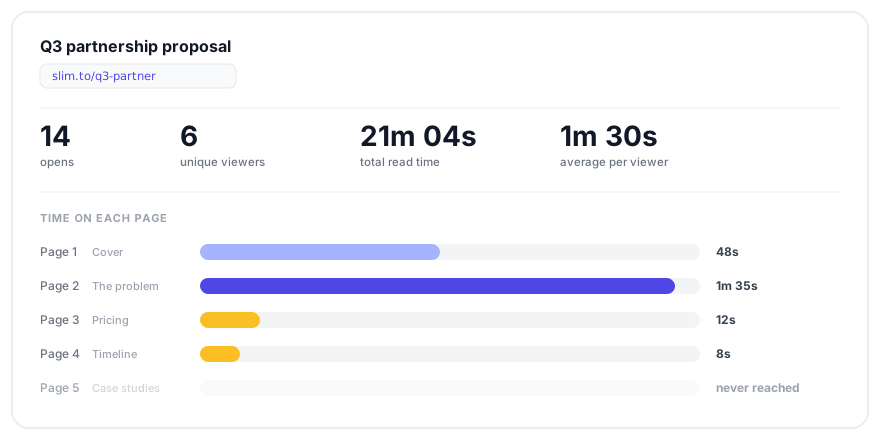
Heavy time on one page, nothing after it. Almost always the pricing page.
They hit a number they need to think about, or take to someone else. This is the most actionable pattern there is: the objection has a page number. Address that specific thing in your next message rather than asking "any thoughts?"
The full read
Steady time across every page, in order, ending at the end.
Someone is genuinely evaluating. The right move is to give them the next thing they need — references, a security review, an implementation timeline — not to ask whether they've had a chance to look at it. They have.
The committee
One link, several unique viewers, opens clustered within a day or two, sometimes from different countries.
It got forwarded. Your document is now being read by people you have never emailed, and the deal is bigger than the one person you're talking to. Ask who else is involved — you already know there is someone.
Opens versus unique viewers
Two numbers that look similar and mean different things:
- Opens counts every session. One person checking twice adds two.
- Unique viewers counts distinct people, identified by a lightweight browser fingerprint (timezone, screen width, language). When that isn't available it falls back to counting sessions.
Fourteen opens from three unique viewers is three interested people, not fourteen. Read them together or you'll flatter yourself.
What it can't tell you
Worth being honest about the edges:
- Reading isn't understanding. Ninety seconds on a page means their browser showed it for ninety seconds. It doesn't mean they agreed.
- Fingerprints are approximate. Two colleagues on identical laptops in the same office can collapse into one "unique viewer", and one person on a laptop and a phone can look like two.
- Location is IP-derived. It's the network's location, which for a VPN or a corporate proxy may be a different continent from the human.
- Bots inflate opens. Corporate email scanners follow links. They show up as opens with essentially no read time — one more reason to look at time rather than count.
Getting the data out
Everything shown in the dashboard is available as CSV export on any link's
analytics view, and through
GET /api/v1/analytics/links/<id> if you'd rather pull
it into a spreadsheet, a warehouse, or your CRM.
If you have an AI assistant connected over MCP, you can also just ask it — it can read the analytics back and summarise them without you opening anything.
Where to go next
Keep reading
-
How to know when someone opens your PDF
Email attachments tell you nothing. Here's how to send a PDF as a tracked link...
-
You sent the proposal Tuesday. Here's what you know by Thursday.
A walkthrough of one job — sending a proposal as a tracked link, reading what comes...
-
QR codes that tell you who scanned them
Most QR generators hand you a static image and forget you exist. Here's how to make...